Schedule a Training Session
Learn about scheduling a training session. Many commonly asked questions about training can be found right here.

Written by Grayson Akerly
Updated at May 27th, 2026
Table of Contents
SpectrumVoIP offers free unlimited* trainings to all of our customers. These training sessions are able to cover a wide variety of topics regarding your SpectrumVoIP equipment and services.
Training Link
Use this link to schedule a training that works best for you.
Training Link http://schedule.spectrumvoip.com/train
On this website, do the following to schedule a training: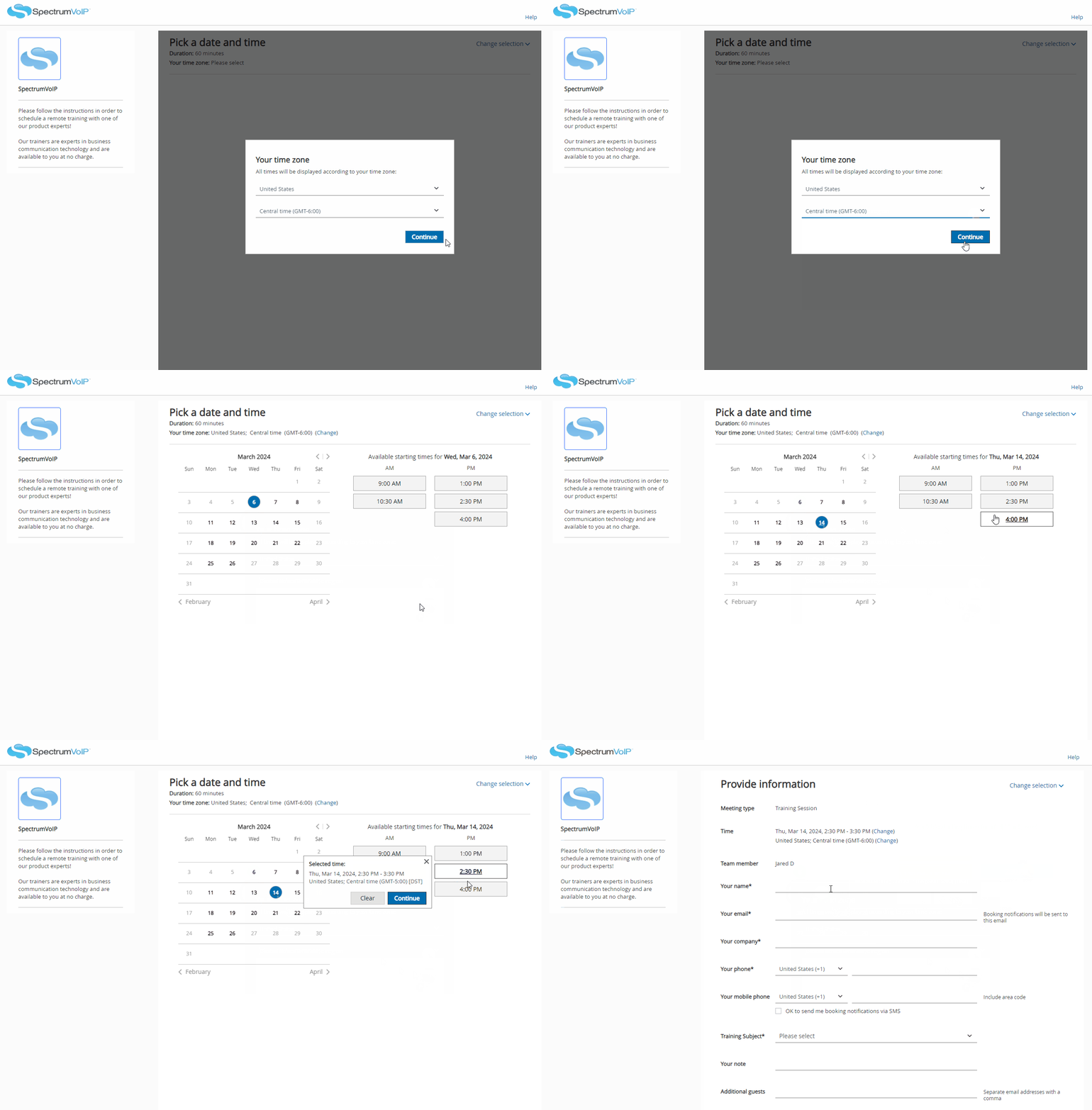
- Select a date and time slot using the calendar.
- In the form, enter your information and the name and phone number of your company.
- In the Additional Guests box, enter the email addresses of any other people that should be invited to the Zoom training.
- Include any additional notes you may want the trainer to be aware of for your session, such as learning goals or any specific questions.
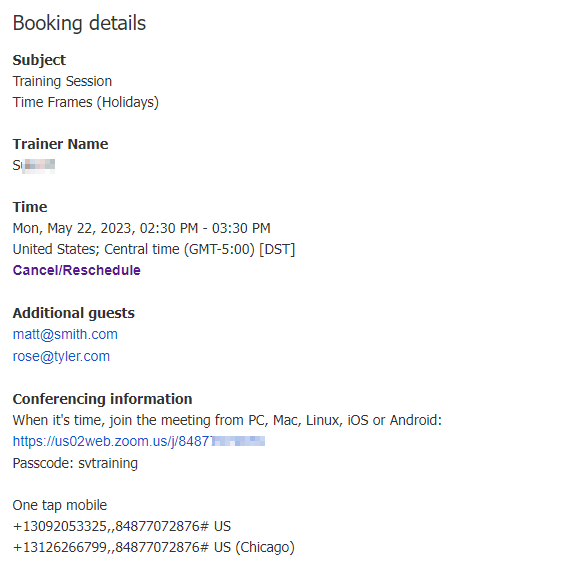
Please make sure to check your email after scheduling. You will receive a confirmation email with the date, time, and meeting invite information.
Who are These Trainings for?
These scheduled trainings are intended for recently installed and current SpectrumVoIP Customers.
If you have not yet gone through the installation process, it is recommended to wait until after your install for a training. Many trainees find it easier to train over their equipment and services once they have these in front of them. You may also find more questions you have after seeing and briefly using your services.
Recently Installed Customers
You should have received an email regarding training already from your Project Manager. If not, please feel free to reach out to your SpectrumVoIP Project Manager or use the link above.
Trainings for new customers can range from going over basic phone usage to learning how to fine-tune your phone system. These sessions can be for individuals and groups.
Existing Customers Already Using SpectrumVoIP's Services
Whether you have been a SpectrumVoIP customer for 1 month, 6 months, 2 years, or 10 years, training is open to any and all current SpectrumVoIP Customers.
Many existing customers will use these trainings as a part of their own training process for their new hires. Existing customers may schedule trainings after some time so that they can meet with a trainer to see if there are any services they are not yet taking advantage of. Some may treat these trainings as brainstorming sessions about how they can improve their phone system.
Where Do These Trainings Happen?
All SpectrumVoIP Trainings are conducted through Zoom. The link to join the zoom meeting will be in the email confirmation you received after scheduling your session.
Do I Have to Download Zoom?
No, you are able to attend the entire session in a web browser.
For more information, please read this article from Zoom:
Getting started with the Zoom web client
Do I Need a Microphone on My Computer?
It is not required, but it definitely makes the entire session better if we are able to converse with our customers during the training.
If the device you will be joining the meeting with does not have a microphone, you can dial into the Zoom meeting on a phone so that you can speak with your trainer while watching the screen from your computer.
To learn more, review the Zoom guide below:
Joining a Zoom meeting by phone
The Phone Number to call in will be on the confirmation email. Most customers will find using the first number on the list to work just fine. The Meeting ID for the meeting can be found at the bottom of the list. 
Do I Need a Camera on My Computer?
No, you do not.
To ensure you are able to learn more about your equipment and services, it is recommended to join the Zoom meeting on a phone, tablet, or PC that is able to display video. Our trainers use cameras and screen sharing to show you how your SpectrumVoIP services work.
Do You Offer On-Site Training?
We currently do not offer on-site training.
These free trainings are hosted over Zoom so that we can be the most efficient with both our time and yours. We appreciate your understanding and will work with you and your organization as best we can so that you can be confident in your choice of SpectrumVoIP.
What Training Subjects Can We Cover?
When you are scheduling a training, you will see many options listed for the Training Subject option. Review the list below to see if there is a specific training subject that best matches your learning needs:
- New Customer - A general, new customer training that focuses on answering questions and touring desk phones and softphone apps.
- New Hire Training - Schedule a training for a new team member joining your company.
- Questions and Answers - If you have specific questions you would like to focus on, select this option and include those questions in the Extra Notes or Questions box.
- Web Portal Admin Training - An Admin user training that focuses on managing your phone system using your web portal.
- Basic Phone Tour - Take a tour through your desk phones and cordless handsets.
- Basic Softphone Tour - Take a tour through the Stratus mobile app and/or the StratusHUB desktop app.
- Call Center Supervisor Training - Explore how you can manage call queues, monitor agents, and pull reports.
- Brainstorming - With the assistance of a trainer, explore ways you can fine-tune your call routing or use additional services to improve the experience of your callers and users.
- Basic Web Portal Training - Have a basic user take a tour of their own version of the web portal.
- Call Center Agent Training - Learn more about changing statuses in queues and using your desk phone/softphones to handle calls.
- Call Center Statistics and Reporting - Learn more about the statistics collected for calls and how you can generate call center reports.
- Call Routing and Forwarding - Learn more about scheduling routing for special events, such as holidays, and setting up call forwards.
- Voicemails and Mailbox Settings- Review how you can check voicemails on your desk phone, softphone, or through email. For admins, review how you can update a user's mailbox settings, such as their voicemail PIN, voicemail notifications, and greeting.
- Auto Attendants and Greetings - Learn more about auto attendants and how you can update their greetings and dial pad menu options.
- Call History and Call Recordings - Review how you can review your call history, pull CDR records, schedule emailed reports, review call recordings, and block specific callers from calling your company.
- StratusMEETING - Video Conferencing - Tour through StratusMEETING; a free video conferencing tool that can be used within Stratus.
- Conference Calls and Conference Bridges - Review conference calling on a desk phone, conference phone, or softphone. Implement a conference bridge if large audio conference calls are necessary for your company. Explore StratusMEETING if your company needs a video conferencing solution.
- Caller ID Information and 911 Emergency Numbers - Learn more about caller IDs and how you can control your outbound caller ID shown to your customers. If you have recently moved offices, learn more about how you can update the address emergency responders will see if a user ever calls 9-1-1 on their SpectrumVoIP device/softphone.
- AND MORE
Note: Don't see what you're looking for listed? Use the Other option to type in a specific training goal.
You can also use the Extra Notes or Questions box to include a note about any specific questions you have so that your trainer can prepare ahead of time.
How Long Are Training Sessions?
Each training session can be up to an hour in length. This is to ensure enough dedicated time to cover the planned material and to allow any follow up questions that may come up during the session.
These trainings do not have to be an hour long. These trainings can be ended early if you have time constraints or just need a couple of questions answered.
Can I Request a Specific Trainer?
After a session with one of our trainers, please feel free to ask the trainer for their direct schedule link so that you can schedule with the same trainer in the future. While schedule availability may be affected, our trainers understand the value of training with the same individual.